OkaySend
Sign inVersion 0.1.1
OkaySend API Documentation
Last Updated: August 15, 2026
Introduction
👋 Welcome! Let's get you started.
This section of the documentation details all the API Endpoints available in OkaySend and all the parameters you can use with them.
OkaySend helps businesses collect documents faster. It lets you create secure client portals and automates the entire process. This saves hours of admin work, speeds up client onboarding, and keeps every request organized and trackable.
Get Started
Start building in under a minute.
First things first. If you haven't already, set up an account in under a minute and start building your integration.
-
Create your account 🚀
Create account
Begin by quickly signing up.
-
Grab your keys 🔑
Create an API key
Create an API key that allows you to do the operation you want. For security and as best practice, create API keys with only the permissions you need. Learn more about allowed actions and scopes.
-
Send your first request 📁
Send document request
To get familiar with OkaySend, start by sending yourself a document request. Use a template from the dashboard and play around with the editor.
Things you should know
-
Every resource has an ID inside OkaySend. These are unique identifiers and you'll see us reference "Client ID", "Request ID", or "Template ID", etc. to name a few. You'll need these to fetch and read specific records. You can easily find and copy these IDs from the dashboard or in the responses OkaySend sends back to you.
-
API keys do not expire. The only time you'll be able to see the API key is when you first generate it. Please copy it as you wont be able to retrieve the key again. If you're using the key in a front-end app, please rotate your keys from time to time and only allow access to the actions you need for each key. You can generate more than one key and it's best practice to keep keys separate for each action. For example, use different keys to create and send a new document requests from the key used to read responses.
-
You need to be on a paid plan or trialing to use this API. You can access OkaySend's API at no extra cost and it is part of your selected plan.
-
Receive instant notifications when specific events occur. You can use Webhooks to listen to events inside OkaySend instead. Each request from OkaySend contains an JSON object with a reference to the object on OkaySend that was modified.
AI tooling
Teaching AI assistants how to work with OkaySend. We’re launching an MCP server and custom Agent Skills to make integrating effortless. Check out our roadmap to see when it drops.
Want to be the first to try it? Reach out for early access and help shape what we build next.
Unique Identifiers
OkaySend uses unique identifiers (IDs) to track and manage every resource. Whether you are retrieving a specific record or updating an existing one, you'll need to pass the corresponding Client ID, Request ID, or Template ID. All resource IDs can be copied directly from the dashboard or read from the JSON payloads returned by our endpoints.
How to Find and Copy IDs in the Dashboard?
Here is how to copy a Client ID:
-
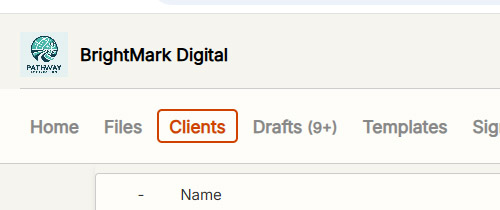
Navigate to the Resource Page: Navigate to the Clients page.
-
Locate the Client: Find the specific client you need from the list or use the search bar.
-
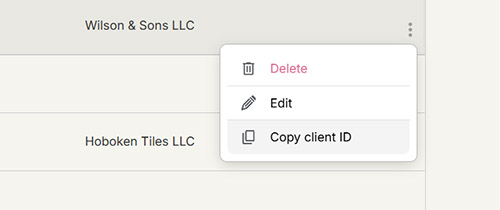
Open the Options Menu: Click the three dots (⋮) icon on the far right of the client's row.
-
Copy the ID: Select Copy Client ID from the dropdown menu. The identifier is now copied to your clipboard.
Here is how to copy a Template ID:
-
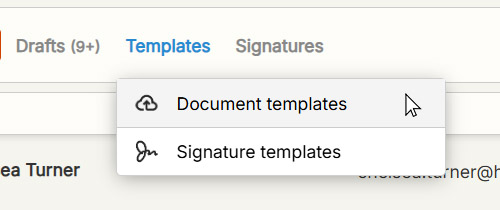
Navigate to the Document Request Templates Page: Navigate to the Templates page.
-
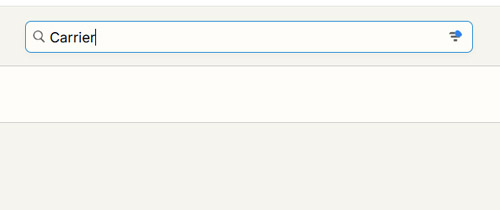
Locate the Template: Find the specific template you need from the list or use the search bar.
-
Open the Options Menu: Click the three dots (⋮) icon on the far right of the template's row.
-
Copy the ID: Select Copy Template ID from the dropdown menu. The identifier is now copied to your clipboard.
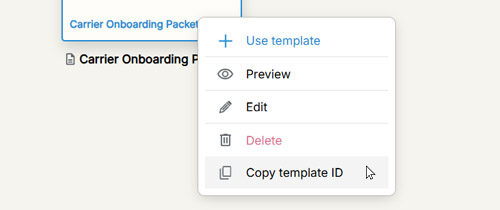
Here is how to copy a Section ID:
-
Navigate to the Section Templates Page: Find Section Templates page from the Settings.
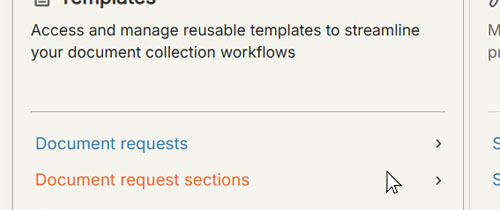
-
Locate the Template: Find the specific template you need from the list or use the search bar.
-
Open the Options Menu: Click the three dots (⋮) icon on the far right of the template's row.
-
Copy the ID: Select Copy Template ID from the dropdown menu. The identifier is now copied to your clipboard.
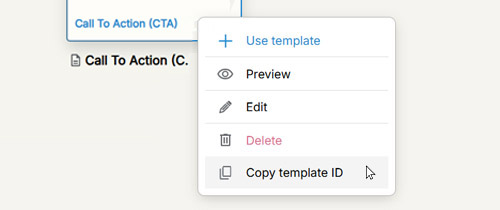
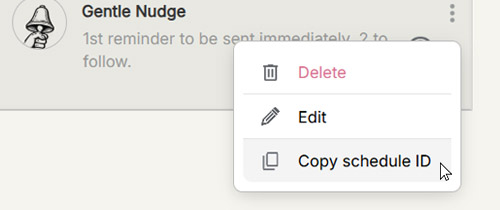
Here is how to copy a Reminder Schedule ID:
-
Navigate to the Reminder Schedules Page: Navigate to your Settings, then the Reminders page.
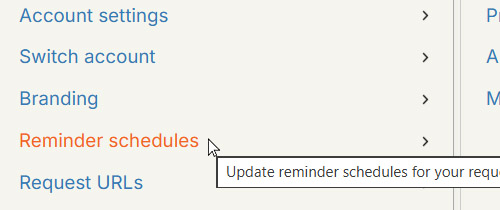
-
Locate the Schedule: Find the specific reminder schedule you need from the list.
-
Open the Options Menu: Click the three dots (⋮) icon on the far right of the schedule's row.
-
Copy the ID: Select Copy Schedule ID from the dropdown menu.
Here is how to copy a Folder ID:
-
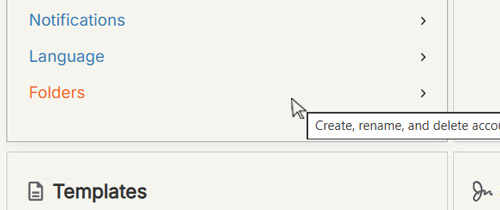
Navigate to the Folders Page: Navigate to your Settings, then the Folders page.
-
Locate the Folder: Find the specific folder you need from the list.
-
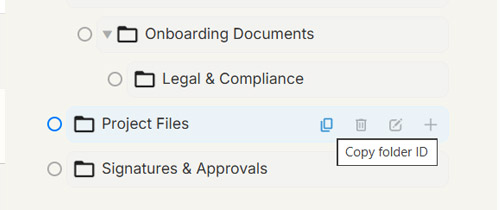
Copy the ID: Hover over the folder and click Copy Folder ID.
Here is how to copy a Request ID:
-
Locate the Request in the Editor: Open the request editor based on its current status:
-
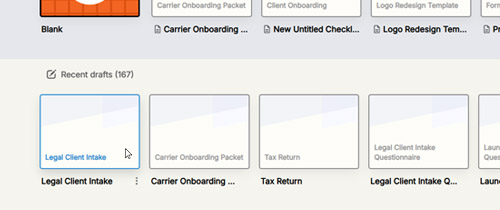
For Drafts: Navigate to the Drafts page and open your draft in the editor.
-
For Sent Requests: From the main dashboard, locate the sent request, click the three dots (⋮) row menu, and select Edit Request to open the editor.
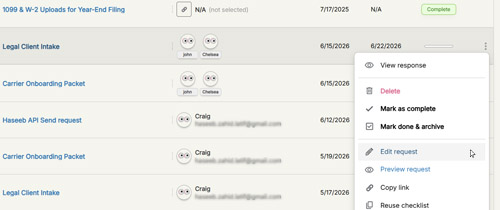
-
-
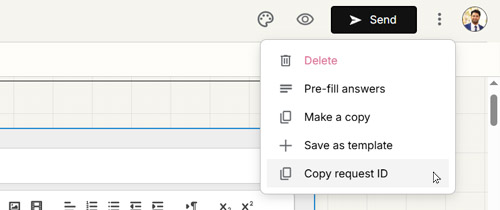
From the Editor: Once inside the request editor, locate the three dots (⋮) menu icon in the top-right corner of the page.
-
Copy the ID: Select Copy Request ID from the dropdown menu.
API Keys
Create an API Key
Let's begin by creating an API key from your API Keys Settings that'll allow you to do all operations.
-
On the API Keys Settings page, scroll down to find the API Keys section.
-
Enter a description. This can be a name or short description to reference the API key.
-
Then select only the permissions you want to grant.
-
Click Create API Key.
-
Copy and save the key value. You can’t retrieve it later.
Keys you’ve forgotten or lost access to can’t be recovered. If you lose a key, rotate or delete it and create another.
If a request doesn’t include a valid key, OkaySend returns an invalid request error. Use the Dashboard to create, delete, disable and rotate API keys.
Keys are best not exposed outside your application’s backend.
You’re responsible for protecting your API keys. Be sure to rotate your keys when a team member with access to the keys leaves your organization. Also, don’t share keys over email or post them online.
Disable an API Key
You can temporarily disable an API key without deleting it. Disabled API keys cannot be used to authenticate API requests until they are re-enabled.
-
Go to your API Keys Settings page.
-
Scroll down to the API Keys section to view your existing keys.
-
Locate the API key you want to manage.
-
Click the three-dot menu (⋮) next to the API key.
-
Select Disable to immediately prevent the key from being used.
-
If you need to restore access later, open the three-dot menu (⋮) again and select Enable.
Why disable an API key?
Disabling an API key is useful if you suspect it has been exposed, shared unintentionally, or is being misused. It immediately blocks API access while preserving the key and its configuration, allowing you to investigate the issue or re-enable the key later if needed.
Delete an API Key
You can permanently delete an API key that is no longer needed. Once deleted, the key cannot be recovered or used again.
-
Go to your API Keys Settings page.
-
Scroll down to the API Keys section to view your existing keys.
-
Locate the API key you want to delete.
-
Click the three-dot menu (⋮) next to the API key.
-
Select Delete.
-
Review the confirmation message and confirm the deletion.
Permissions and Scopes
When creating an API key, you can limit access by selecting only the permissions required for your integration. Following the principle of least privilege helps reduce security risks by granting only the minimum access needed.
| Required Permission | Description | Endpoint(s) |
|---|---|---|
| Read Document Requests | Access and view document request details, submitted responses, and request-related data. | GET /requests |
| List Document Requests | List and search the document requests sent from your account. | GET /requests/lookup |
| Create Document Requests | Create, send, and update document requests and its data. | POST /requests
PATCH /requests
POST /requests/sections
PATCH /blocks
|
| Delete Document Requests | Permanently delete document requests and associated request data. | DELETE /requests |
| Read Document Request Templates | Access and retrieve available document request templates. | GET /templates |
| Read Client Records | Retrieve details for a specific client. | GET /clients |
| List Client Records | List and search clients added in your account. | GET /clients/lookup |
| Create and Update Clients | Create new client records and update existing client information. | POST /clientsPATCH /clients |
| Delete Clients | Permanently delete client records. | DELETE /clients |
Tip
Security recommendation: Only grant the permissions your integration requires. For example, an integration that only needs to create document requests should not be granted permissions to delete requests or manage client records.
API Overview
Endpoint URL
Endpoint URL:
The OkaySend API is a standard REST API. All requests are made over HTTPS, use standard HTTP methods, and require authentication.
Current: 0.1.1
https://api.okaysend.com/v1
Example endpoint structure:
https://api.okaysend.com/v1/[ENDPOINT]?id=[SOME_REQUEST_ID]
| Name | Description |
|---|---|
| Base URL | https://api.okaysend.com/v1/ |
| Endpoint | The specific path appended to the base URL that targets a unique resource (like /clients or /templates) and determines what action the API will perform. |
| Other query parameters | Some endpoints require or expect one or more query parameters. E.g. &id=-OrxcY... or &default=true |
Authentication
All requests require you to authenticate yourself to the service. In order to do this you must include your API key, with the correct permissions.
Include your API key in the HTTP Header:
| Header | Description |
|---|---|
| Content-Type | application/json |
| Accept | application/json |
| X-OKAYSEND-API-KEY | API key from your OkaySend API keys settings page. |
curl -X GET "https://api.okaysend.com/v1/clients" \
-H "X-OKAYSEND-API-KEY: ${API_KEY}" \
-H "Content-Type: application/json"'
Tip: HTTP headers are case-insensitive
HTTP Response Codes
| Code | Type | Description |
|---|---|---|
| 2xx | Success | Everything went smooth. This could be 200 or 201. |
| 400 | Bad request | Missing required parameters or the request could not be understood due to malformed syntax. |
| 401 | Unauthorized | Missing or incorrect API key. Usually will result in a "Access denied" error message. |
| 403 | Permission denied | Permission denied due to missing scope grants or allowed actions, or invalid or inactive credentials. |
| 404 | Not found | The requested resource does not exist. Please verify the endpoint path and resource ID. |
| 500 | Internal server error | An unexpected error occured processing your request. This is often a generic error message. |
API Error Codes
OkaySend uses standard HTTP response codes to indicate the success or failure of a request.
Codes in the 4xx range indicate an error given the information provided (e.g. a required parameter was omitted), and codes in the 5xx range indicate an error with the OkaySend service itself.
| Parameter | Description |
|---|---|
| 400 | Bad Request - The request could not be understood due to malformed syntax. |
| 401 | Unauthorized - Your API key is wrong or the access token has expired. |
| 403 | Permission Denied - Permission denied due to missing scope grants or allowed actions, or invalid or inactive credentials. |
| 404 | Not Found - The requested resource does not exist. Please verify the endpoint path and resource ID. |
| 500 | Internal Server Error - Our servers encountered an unexpected error while fetching or updating data to our database. |
| 503 | Service Unavailable - We’re temporarily offline. Please try again later. |
API Reference
Read Document Request
This endpoint is responsible for fetching request data and responses using its specific ID.
Read a single document request
Tip: You may use the Request updated webhook instead to keep request records synchronized in real time, rather than polling the API for changes.
Request headers
| Header | Description |
|---|---|
| Accept | application/json |
| X-OKAYSEND-API-KEY | API key from your OkaySend API keys settings page. |
Request example
curl "https://api.okaysend.com/v1/requests?id=-NfEL-9_aHCIEl3S80x8r" \
  -X GET \
  -H "Accept: application/json" \
  -H "X-OkaySend-API-Key: your-API-key" \
Querystring parameters
| Parameter | Type | Description |
|---|---|---|
| id | string | required Unique identifier for the document request. |
Response
| Field | Type | Description |
|---|---|---|
| clients | object | A map of client objects allowed access to the portal. |
| id | string | Optional Unique identifier for the client. |
| string | Email address of the client. | |
| name | string | Full name of the client. |
| created_at | number | Unix timestamp of when the client record was created. |
| phone | string | Optional Phone number of the client. |
| company | string | Optional Company name associated with the client. |
| folder_path | string | A hierarchical path of folder IDs representing the folder structure containing this request. The last ID in the path is the immediate parent folder. |
| due_date | number | Unix timestamp (in milliseconds) representing the deadline for completion. |
| progress | number | The completion progress percentage (e.g., 0 to 100). |
| sent_date | number | Unix timestamp (in milliseconds) indicating when the request was sent. |
| status | string | Current state of the workflow (e.g., "sent", "draft", "completed"). |
| title | string | The main heading or title of the questionnaire/request. |
| user | string | The identifier of the internal user or service that created the request. |
| response | object | A map containing user-submitted answers and uploaded files, keyed by block IDs. |
| blocks | object | A map of individual form elements or questions, keyed by unique block IDs. |
| title | string | The label or question text displayed to the user. |
| status | string | The current state of this specific block/field/question (e.g., "done", "approved", "rejected"). |
| isRequired | boolean | Flags whether this block must be completed before submission. |
| type | string | The input type classification for rendering (e.g., "type_upload", "type_formatted_long_answer", "type_dropdown"). |
| desc | string | Optional An instruction, description, or helper text providing context. |
| options | object | Optional A map of selections or choices returned for choice-based and grouped list types (e.g., type_dropdown, type_multi, type_checkbox, type_grouped_answer). Keyed sequentially starting from "0" and can be parsed sequentially as an array. |
| upload_rules | object | Optional A map of file upload rules, such as allowed file types and size limits. |
| allow_any | boolean | Flags whether this upload field accepts any file type or only specific allowed file types. |
| max_files | string | The maximum number of files that can be uploaded to this field. May be parsed as an integer. |
| max_size | string | The maximum allowed file size in megabytes (MB) for each uploaded file. May be parsed as an integer. |
| unlocked_pdf_only | boolean | Optional Flags whether uploaded PDF files must be unprotected and not password-protected. Only valid if PDFs are allowed to be uploaded. |
| allowed_types | object | Optional A map of file types that can be uploaded when allow_any is set to false. |
| validate | object | Optional A map of validation and conditional logic rules. Text-based field types such as type_short may define validation rules (e.g., maximum character count or numeric-only input), while dropdown type_dropdown and multiple-choice type_multi field types may define conditional logic rules. |
| validate | object | Optional A map of validation and conditional logic rules. Text-based field types such as type_short may define validation rules (e.g., maximum character count or numeric-only input), while dropdown type_dropdown and multiple-choice type_multi field types may define conditional logic rules. |
| add_label | string | Optional Custom text displayed for the "Add Item" button in list-based field types (e.g., type_long_answer_list, type_grouped_answer). |
| placeholder | string | Optional Custom placeholder text for text answer field types (e.g., type_short, type_formatted_long_answer). |
| columns | object | Optional A map of column choices used in a "type_multi_choice_grid" or "type_checkbox_grid" field type. |
| row | object | Optional A map of row items used in a "type_multi_choice_grid" or "type_checkbox_grid" field type. |
| default_lang | string | Short two-letter code for the default client communication (email, SMS, etc.) and portal interface language. |
| entity | string | The unique account ID the request belongs to. |
| login | boolean | Specifies whether the client must verify their email before accessing the portal. |
| messages | object | A map of the comments. |
| multi_clients | boolean | Indicates whether the request has more than one client added. |
| sections | object | A map of layout sections used to group blocks, keyed by section IDs. |
| outline | object | An ordered structure mapping out the visual hierarchy and placement of sections and blocks. |
| reminder_sched | object | A map of configurations for automatic reminder scheduling, including timing rules, email templates, and trigger conditions. |
| sender | string | Identifier of the sender, which may be a user ID or an alias used for sending on behalf of another user. |
Response example
HTTP/1.1 200 OK
Content-Type: application/json
{
"allowed_clients": {
"-N_vOu60xmvyno9gycNF": {
"allowed": true,
"email": "john@mycomapny.com",
"name": "John Smith"
},
"-OiFyGjRfHfSY5q4AQIP": {
"allowed": true,
"email": "chelsea.turner@hobokentiles.com",
"name": "Chelsea Turner"
}
},
"blocks": {
"-OsvT7HCCiZURp2l7Fzh": {
"isRequired": true,
"placeholder": "E.g. Smith Transportation LLC",
"status": "done",
"title": "Legal name",
"type": "type_short"
},
"-OsvTqZrUfWa9KmyCNXN": {
"desc": "Provide the DBA (Doing Business As). The public-facing trade name the company uses, if different.
",
"isRequired": false,
"placeholder": "E.g. FastLane Freight",
"status": "done",
"title": "DBA (if applicable)",
"type": "type_short"
},
"-OsvUA2JFcEpxXWQuucM": {
"desc": "Enter the primary business address. This is the main location where your company operates and conducts business.
",
"isRequired": true,
"placeholder": "E.g. 1450 Industrial Park Rd, Dallas, TX 75207, USA",
"status": "done",
"title": "Principal address",
"type": "type_short"
},
"-OsvVgD37JI9drK5jr4d": {
"desc": "Primary contact number
",
"isRequired": true,
"placeholder": "E.g. 1450 Industrial Park Rd, Dallas, TX 75207, USA",
"status": "done",
"title": "Phone number",
"type": "type_phone"
},
"-OsvVsnqGutzeVKQvQGT": {
"desc": "Primary contact
",
"isRequired": true,
"status": "done",
"title": "Email address",
"type": "type_email"
},
"-OsvW5Q_d8F3h7fMCYqe": {
"desc": "Request for Taxpayer Identification Number. Must match legal entity name; required before first payment can be issued.
",
"isRequired": true,
"status": "done",
"title": "W-9 form",
"type": "type_upload",
"upload_rules": {
"allow_any": true,
"max_files": "3",
"max_size": "100",
"unlocked_pdf_only": false
}
},
"-OsvWMy6lSk8mVD6xcI2": {
"desc": "Sole proprietors may submit SSN in lieu of EIN.
",
"isRequired": true,
"status": "done",
"title": "Federal EIN / Tax ID",
"type": "type_short"
},
"-OsvWvlRT9gufPCaGKwv": {
"desc": "LLC, Corporation, Sole Proprietor, Partnership, etc.
",
"isRequired": true,
"status": "done",
"title": "Business entity type on file?",
"type": "type_short"
},
"-OsvXXOKeqrwnsHj3r7b": {
"desc": "The general point of contact for non-urgent matters, paperwork questions, or relationship management.
Usually the owner, operations manager, or whoever handles the business relationship.
",
"isRequired": true,
"status": "done",
"title": "Primary contact (phone)",
"type": "type_phone"
},
"-OsvXtI4aRk1071DNrn1": {
"desc": "Critical point of contact. A direct cell number for someone at the company.
",
"isRequired": true,
"status": "done",
"title": "After-hours contact (phone)",
"type": "type_phone"
},
"-OsvYAZMOLAJjySYhIJW": {
"desc": "Person or team actively managing the drivers and trucks day-to-day.
",
"isRequired": true,
"status": "done",
"title": "Dispatch contact (phone)",
"type": "type_phone"
},
"-OsvYO5NcULM_fKC3k_5": {
"desc": "Who should we contact regarding payments, invoices, or billing questions?
This may be an owner, office manager, or your factoring company's representative.
If payments are assigned to a third-party factoring company, list the factor's remittance contact here and submit a signed Notice of Assignment (NOA) in the Payment & Remittance section.
",
"isRequired": true,
"status": "done",
"title": "Remittance / accounts receivable contact (phone)",
"type": "type_phone"
},
"-OsvZb-VuDG-EDh2pJf5": {
"desc": "The general point of contact for non-urgent matters, paperwork questions, or relationship management.
Usually the owner, operations manager, or whoever handles the business relationship.
",
"isRequired": false,
"status": "done",
"title": "Primary contact (email)",
"type": "type_email"
},
"-OsvZoVs3Jq27Ty8sCQY": {
"desc": "Person or team actively managing the drivers and trucks day-to-day.
",
"isRequired": true,
"status": "done",
"title": "Dispatch contact (email)",
"type": "type_email"
},
"-OsvZxs4Q-m4oVAcBj5l": {
"desc": "Who should we contact regarding payments, invoices, or billing questions?
This may be an owner, office manager, or your factoring company's representative.
If payments are assigned to a third-party factoring company, list the factor's remittance contact here and submit a signed Notice of Assignment (NOA) in the Payment & Remittance section.
",
"isRequired": true,
"status": "done",
"title": "Remittance / accounts receivable contact (email)",
"type": "type_email"
},
"-Osv_6DXwHJiONy3Vw09": {
"desc": "via FMCSA SAFER system (fmcsa.dot.gov)
",
"isRequired": true,
"title": "USDOT number verified as active",
"type": "type_short"
},
"-Osv_L-psdfSmMOSguuH": {
"desc": "Motor Carrier number on file and authority confirmed active
",
"isRequired": true,
"title": "Motor Carrier (MC)",
"type": "type_short"
},
"-Osv_UOFateRxwo4LfZj": {
"isRequired": false,
"title": "SCAC code on file",
"type": "type_short"
},
"-Osv_Zamg_fq7UN27mA4": {
"desc": "Select operation scope(s).
",
"isRequired": true,
"options": [
{
"image": "",
"type": "choice_li",
"value": "Common carrier"
},
{
"image": "",
"type": "choice_li",
"value": "Contract carrier"
},
{
"image": "",
"type": "choice_li",
"value": " Both"
}
],
"title": "Operating authority type",
"type": "type_dropdown"
},
"-OsvaFWVf2xcgg2FBnlG": {
"desc": "(BCA) received (e-sign or PDF)
",
"isRequired": true,
"title": "Signed broker-carrier agreement",
"type": "type_upload",
"upload_rules": {
"allow_any": false,
"allowed_types": [
"pdf"
],
"max_files": "3",
"max_size": "1000",
"unlocked_pdf_only": true
}
},
"-OsvbshHOz_5AXbOkJdz": {
"desc": "Please upload the MCS-150 form.
",
"isRequired": true,
"title": "Copy of MCS-150 (Motor Carrier Identification Report)",
"type": "type_upload",
"upload_rules": {
"allow_any": false,
"allowed_types": [
"pdf"
],
"max_files": "3",
"max_size": "1000",
"unlocked_pdf_only": true
}
},
"-Osvclbe2tCliz7rv4-n": {
"isRequired": true,
"title": "BOC-3 (Blanket of Coverage / process agent filing) confirmed",
"type": "type_short"
},
"-OsvcqD1rzjxvHfKr5ZC": {
"desc": "Official safety evaluation issued by the Federal Motor Carrier Safety Administration (FMCSA)
",
"isRequired": true,
"options": [
{
"image": "",
"type": "choice_li",
"value": "Satisfactory"
},
{
"image": "",
"type": "choice_li",
"value": "Unsatisfactory"
},
{
"image": "",
"type": "choice_li",
"value": "Conditional"
}
],
"title": "Safety rating on file",
"type": "type_dropdown"
},
"-OsvdTnhKKmn5sfMEhsH": {
"desc": "Please upload the MCS-150B or EPA, if applicable.
",
"isRequired": false,
"title": "Hazmat registration (if applicable)",
"type": "type_upload",
"upload_rules": {
"allow_any": false,
"allowed_types": [
"pdf"
],
"max_files": "3",
"max_size": "1000",
"unlocked_pdf_only": true
}
},
"-OsvdmoD3sbS0M46vazT": {
"desc": "Please upload copies of Transportation Worker Identification Credential cards to keep on file and prove compliance.
",
"isRequired": false,
"title": "TWIC card copies for drivers (if applicable)",
"type": "type_upload",
"upload_rules": {
"allow_any": false,
"allowed_types": [
"pdf"
],
"max_files": "25",
"max_size": "100",
"unlocked_pdf_only": true
}
},
"-OsyA8APwG3Az3aS20p3": {
"desc": "The uploaded COI should show your broker named as certificate holder.
Please also ensure your COI reflects currently active coverage. Expired certificates will not be accepted. If you are unsure whether your certificate is current, contact your insurance agent directly.
",
"isRequired": true,
"title": "Certificate of insurance (ACORD 25)",
"type": "type_upload",
"upload_rules": {
"allow_any": false,
"allowed_types": [
"pdf"
],
"max_files": "2",
"max_size": "100",
"unlocked_pdf_only": false
}
},
"-OsyAvlCBm5b4_gJ7NjM": {
"desc": "Workers' compensation (ACORD 130)
",
"isRequired": false,
"title": "Workers' compensation (if applicable)",
"type": "type_upload",
"upload_rules": {
"allow_any": false,
"allowed_types": [
"pdf"
],
"max_files": "2",
"max_size": "1000",
"unlocked_pdf_only": false
}
},
"-OsyAwj_he71GzdAD66S": {
"desc": "If not listed on the Certificate of insurance, please upload separate declarations page with full policy endorsement.
",
"isRequired": false,
"title": "Excess / umbrella liability (if applicable)",
"type": "type_upload",
"upload_rules": {
"allow_any": false,
"allowed_types": [
"pdf"
],
"max_files": "3",
"max_size": "1000",
"unlocked_pdf_only": false
}
},
"-OsyCuKztgZizhpSw8hv": {
"desc": "Please upload an updated and recent trailer interchange policy that includes all riders.
",
"isRequired": false,
"title": "Trailer interchange or non-owned trailer coverage (if applicable)",
"type": "type_upload",
"upload_rules": {
"allow_any": false,
"allowed_types": [
"pdf"
],
"max_files": "5",
"max_size": "1000",
"unlocked_pdf_only": false
}
},
"-OsyE8evMoUkzANJaSG4": {
"desc": "COI may only show limits. Need the actual cargo declarations page to verify what's excluded.
",
"isRequired": false,
"title": "Cargo policy with commodity endorsements (if applicable)",
"type": "type_upload",
"upload_rules": {
"allow_any": false,
"allowed_types": [
"pdf"
],
"max_files": "5",
"max_size": "1000",
"unlocked_pdf_only": false
}
},
"-OsyEMJdAASUJTORAUCB": {
"desc": "This Insurance Documentation section has:
- the primary COI (Certificate of insurance) upload
- and a secondary upload for any standalone policies not reflected on it
A COI alone may often not be sufficient on its own. Please upload any required documents in this section for compliance and smooth onboarding.
",
"title": "Instructions",
"type": "type_desc"
},
"-OsyGBkHQWYgBpaVgPVK": {
"isRequired": true,
"options": [
{
"image": "",
"type": "choice_li",
"value": "I confirm our auto liability coverage meets or exceeds $1,000,000 combined single limit (CSL)"
}
],
"title": "Primary auto liability",
"type": "type_checkbox"
},
"-OsyG_vZUKdmzJ69NFfU": {
"isRequired": true,
"options": [
{
"image": "",
"type": "choice_li",
"value": "I confirm our motor truck cargo coverage meets or exceeds $100,000 and I understand commodity exclusions may apply"
}
],
"title": "Motor truck cargo (MTC)",
"type": "type_checkbox"
},
"-OsyGm9FH21JA48qOw8p": {
"isRequired": true,
"options": [
{
"image": "",
"type": "choice_li",
"value": "I confirm our general liability coverage meets or exceeds $1,000,000 per occurrence"
}
],
"title": "General liability",
"type": "type_checkbox"
},
"-OsyH7fWGFahksa1XoRe": {
"add_label": "Add another unit",
"desc": "Enter type, year, make, and VIN(s) on file. Each piece of equipment needs its own record. E.g., dry van, reefer, flatbed, step deck, tanker, LTL, etc.
Example of a completed submission:
1\tDry van, 2021, Wabash, 1JJV532B4ML123456\t\t
2\tDry van, 2019, Great Dane, 1GRAA0629KB701234\t\t
3\tReefer, 2020, Utility, 1UYVS25369U123789\t\t
",
"isRequired": true,
"options": [
{
"image": "",
"type": "text",
"value": "Equipment type"
},
{
"image": "",
"type": "number",
"value": "Year"
},
{
"image": "",
"type": "text",
"value": "Make / manufacturer"
},
{
"image": "",
"type": "text",
"value": "VIN"
}
],
"title": "Equipment type(s)",
"type": "type_grouped_answer"
},
"-OsyJnyWcDBqlhoBmC4f": {
"isRequired": true,
"options": [
{
"image": "",
"type": "choice_li",
"value": "Yes"
},
{
"image": "",
"type": "choice_li",
"value": "No, we pull customer/shipper-provided trailers"
},
{
"image": "",
"type": "choice_li",
"value": "Both"
}
],
"title": "Do you operate carrier-owned trailers?",
"type": "type_multi",
"validate": [
{
"check": "show_section",
"condition": {
"id": "-OsyMw871JaaxFxvAmEh",
"title": "Trailer dimensions confirmed"
},
"type": "Yes"
},
{
"check": "show_section",
"condition": {
"id": "-OsyMw871JaaxFxvAmEh",
"title": "Trailer dimensions confirmed"
},
"type": "Both"
}
]
},
"-OsyL1TUZHLG4XucjNYe": {
"add_label": "Add trailer type",
"desc": "Enter length, width, height, and capacity on file. Each trailer needs its own record.
Example of a completed submission:
1\tDry van, 53', 45,000 lb, 12\t\t
2\tFlatbed, 48', 48,000 lb, 4\t\t
3\tReefer, 53', 43,500 lb, 5\t\t
",
"isRequired": false,
"options": [
{
"image": "",
"type": "text",
"value": "Trailer type (dry van, reefer, flatbed, etc.)"
},
{
"image": "",
"type": "number",
"value": "Length"
},
{
"image": "",
"type": "number",
"value": "Cargo capacity (lbs)"
},
{
"image": "",
"type": "number",
"value": "Quantity owned"
}
],
"title": "Trailer(s)",
"type": "type_grouped_answer"
},
"-OsyNgbLGQz56ah1Kk6w": {
"add_label": "Add provider",
"desc": "Please enter provider name and registration.
",
"isRequired": true,
"options": [
{
"image": "",
"type": "text",
"value": "ELD provider (e.g. Motive, Samsara, Omnitracs)"
}
],
"title": "ELD mandate compliance",
"type": "type_grouped_answer"
},
"-OsyP0ystCl_RuXzZGjQ": {
"isRequired": true,
"options": [
{
"image": "",
"type": "choice_li",
"value": "No, we are NOT exempt from ELD"
},
{
"image": "",
"type": "choice_li",
"value": "Yes, we qualify for the short-haul exemption (150 air-mile radius)"
}
],
"title": "We qualify for the short-haul exemption and are not required to use an ELD",
"type": "type_multi",
"validate": [
{
"check": "show_section",
"condition": {
"id": "-OsyOks7Bcq-AVOod57r",
"title": "ELD mandate compliance confirmed"
},
"type": "No, we are NOT exempt from ELD"
}
]
},
"-OsyV1K_TJMgrIA7m35D": {
"isRequired": true,
"options": [
{
"image": "",
"type": "choice_li",
"value": "1–5 drivers"
},
{
"image": "",
"type": "choice_li",
"value": "6+"
}
],
"title": "How many drivers do you currently employ?",
"type": "type_multi",
"validate": [
{
"check": "show_section",
"condition": {
"id": "-OsyVcbCSPjDaLOx87QM",
"title": "Driver Information"
},
"type": "1–5 drivers"
},
{
"check": "show_section",
"condition": {
"id": "-OsyW63V3_psYUYAj_uD",
"title": "Driver Information"
},
"type": "6+"
}
]
},
"-OsyVfALr-uX2Cz-99_3": {
"add_label": "Add another driver",
"isRequired": true,
"options": [
{
"image": "",
"type": "text",
"value": "Full legal name"
},
{
"image": "",
"type": "text",
"value": "CDL class (A, B, or C)"
},
{
"image": "",
"type": "text",
"value": "Issuing state"
},
{
"image": "",
"type": "number",
"value": "CDL number"
},
{
"image": "",
"type": "date",
"value": "Expiration date"
}
],
"title": "Driver list with CDL class and state on file",
"type": "type_grouped_answer"
},
"-OsyW63X2lOUL28e8pIX": {
"add_label": "Add another driver",
"desc": "Please upload a driver roster as a CSV or Excel file with the following columns: Full legal name, CDL class, issuing state, CDL number, expiration date
",
"isRequired": true,
"options": [
{
"image": "",
"type": "choice_li",
"value": "Full legal name"
},
{
"image": "",
"type": "choice_li",
"value": "CDL class (A, B, or C)"
},
{
"image": "",
"type": "choice_li",
"value": "Issuing state"
},
{
"image": "",
"type": "choice_li",
"value": "CDL number"
},
{
"image": "",
"type": "choice_li",
"value": "Expiration date"
}
],
"title": "Driver list with CDL class and state on file",
"type": "type_upload",
"upload_rules": {
"allow_any": false,
"allowed_types": [
"spreadsheet"
],
"max_files": "2",
"max_size": "1000",
"unlocked_pdf_only": false
}
},
"-OsyWlPabFME5pg--fyh": {
"desc": "Please upload consortium enrollment or company-run program documentation.
",
"isRequired": false,
"title": "Drug & alcohol testing program on file (FMCSA Part 382)",
"type": "type_upload",
"upload_rules": {
"allow_any": false,
"allowed_types": [
"document",
"pdf"
],
"max_files": "3",
"max_size": "100",
"unlocked_pdf_only": false
}
},
"-OsyWzapnzBqHWijQ12f": {
"desc": "Required for drivers transporting placardable hazmat quantities.
",
"isRequired": false,
"title": "Hazmat endorsement (HME) copies (if applicable)",
"type": "type_upload",
"upload_rules": {
"allow_any": false,
"allowed_types": [
"document",
"pdf"
],
"max_files": "3",
"max_size": "100",
"unlocked_pdf_only": false
}
},
"-OsyXbPaLBABrAtJbOHH": {
"desc": "Reefer carriers only. Require continuous temp logging, pre-cooling SOP, and alarm thresholds.
Example response:
Reefer unit make and model:
\"Thermo King S-600\"
Temperature range capable: (min and max)
Min: -20°F / Max: 70°F
Continuous temperature monitoring:
\"Yes\"
Temp logging method:
\"Thermo King TracKing telematics, real-time monitoring via app, downloadable temp reports available per load\"
",
"isRequired": true,
"options": [
{
"image": "",
"type": "text",
"value": "Reefer unit make and model"
},
{
"image": "",
"type": "text",
"value": "Temperature range capable"
},
{
"image": "",
"type": "text",
"value": "Continuous temperature monitoring?"
},
{
"image": "",
"type": "text",
"value": "Temp logging method"
}
],
"title": "Temperature capability and monitoring confirmed",
"type": "type_grouped_answer"
},
"-OsyYd22l8M4NZ14Qbdy": {
"isRequired": true,
"options": [
{
"image": "",
"type": "choice_li",
"value": "Yes"
},
{
"image": "",
"type": "choice_li",
"value": "No"
}
],
"title": "Do you operate refrigerated / reefer trailers?",
"type": "type_multi",
"validate": [
{
"check": "show_section",
"condition": {
"id": "-OsyZPbHT16kWHn8NF9k",
"title": "Refrigerated / reefer trailers"
},
"type": "Yes"
}
]
},
"-Osyah5hZo_i2HF-p1cr": {
"isRequired": false,
"options": [
{
"image": "",
"type": "choice_li",
"value": "ACH direct deposit"
},
{
"image": "",
"type": "choice_li",
"value": "Paper check"
},
{
"image": "",
"type": "choice_li",
"value": "Factoring company assignment"
}
],
"title": "Preferred payment method?",
"type": "type_dropdown",
"validate": [
{
"check": "show_section",
"condition": {
"id": "-Osyc3qIO0smGQpnft6_",
"title": "ACH banking details"
},
"type": "ACH direct deposit"
},
{
"check": "show_section",
"condition": {
"id": "-Osyb8KgTWQqGpO7t_q4",
"title": "Notice of Assignment (NOA)"
},
"type": "Factoring company assignment"
}
]
},
"-OsybD-YMAK8-YAiBVqd": {
"isRequired": true,
"title": "Upload NOA document",
"type": "type_upload",
"upload_rules": {
"allow_any": true,
"max_files": "3",
"max_size": "100",
"unlocked_pdf_only": false
}
},
"-OsybNCX_osLJcgURGX3": {
"isRequired": true,
"title": "Factoring company name",
"type": "type_short"
},
"-OsybZlbBgDjMDWpweAE": {
"isRequired": true,
"options": [
{
"image": "",
"type": "choice_li",
"value": "I understand that by submitting a Notice of Assignment, all payments will be remitted directly to my factoring company. Split payments will not be issued without separate written authorization."
}
],
"title": "Acknowledgment ",
"type": "type_checkbox"
},
"-Osyc6WvLrrsCkFlzt4L": {
"isRequired": true,
"options": [
{
"image": "",
"type": "text",
"value": "Bank name"
},
{
"image": "",
"type": "text",
"value": "Account holder name"
},
{
"image": "",
"type": "text",
"value": "Routing number"
},
{
"image": "",
"type": "text",
"value": "Account number"
},
{
"image": "",
"type": "text",
"value": "Account type (Checking / Savings)"
}
],
"title": "ACH banking details",
"type": "type_grouped_answer",
"validate": {
"condition": "1",
"type": "exactly"
}
},
"-OsychgrfwT0-_Z3c0ot": {
"desc": "Standard net-30 from invoice receipt, or quick pay terms if enrolled.
",
"isRequired": true,
"options": [
{
"image": "",
"type": "choice_li",
"value": "I acknowledge and agree to the following payment terms: Net-30 days from receipt of a complete and accurate invoice, including signed BOL and proof of delivery (POD). Incomplete submissions will not be processed until all required documentation is received."
}
],
"title": "Payment terms acknowledgment",
"type": "type_checkbox"
},
"-Osyd3JPiqSGUcn7xH5b": {
"isRequired": true,
"options": [
{
"image": "",
"type": "choice_li",
"value": "Email"
},
{
"image": "",
"type": "choice_li",
"value": "TMS portal"
},
{
"image": "",
"type": "choice_li",
"value": "EDI"
},
{
"image": "",
"type": "choice_li",
"value": "Factoring company submits on my behalf"
}
],
"title": "Invoice submission method?",
"type": "type_multi"
},
"-OsydiD2Y2g9mvG3qdqb": {
"desc": "Fuel surcharge (FSC) schedule acknowledgment
",
"isRequired": true,
"options": [
{
"image": "",
"type": "choice_li",
"value": "I acknowledge that fuel surcharge (FSC) will be applied to each load based on the U.S. Department of Energy (DOE) weekly retail on-highway diesel price index. The FSC rate is reviewed and updated weekly. Current FSC schedule will be provided with each rate confirmation."
}
],
"title": "Fuel surcharge (FSC)",
"type": "type_checkbox"
},
"-OsyeghUfxVFVyJxU3fG": {
"isRequired": false,
"title": "Welcome packet and load tender instructions",
"type": "type_download"
}
},
"clients": {
"-N_vOu60xmvyno9gycNF": {
"company": "N Corp",
"email": "john@mycomapny.com",
"id": "-N_vOu60xmvyno9gycNF",
"name": "John Smith",
"phone": "",
"ref": 2
},
"-OiFyGjRfHfSY5q4AQIP": {
"company": "Hoboken Tiles LLC",
"email": "chelsea.turner@hobokentiles.com",
"id": "-OiFyGjRfHfSY5q4AQIP",
"name": "Chelsea Turner",
"phone": "",
"ref": 1
}
},
"default_lang": "en",
"due_date": 1782068400000,
"entity": "A2VY2m91cnViVnv6W6Aqrkkm23_Company",
"login": true,
"messages": {
"-OvAlNpSKZkWbAj9z40G": {
"from": {
"id": "client",
"name": ""
},
"message": "Our MC authority was recently reinstated. The FMCSA record may not yet reflect the update. Please advise?",
"ref": {
"block_name": "3.1 USDOT number verified as active",
"id": "-Osv_6DXwHJiONy3Vw09",
"section_name": "3. Authority & Regulatory Documents"
},
"status": "unread",
"timestamp": 1781535182466
}
},
"multi_clients": true,
"outline": [
{
"-OsvT7HCCiZURp2l7Fzg": [
"-OsvT7HCCiZURp2l7Fzh",
"-OsvTqZrUfWa9KmyCNXN",
"-OsvUA2JFcEpxXWQuucM",
"-OsvVgD37JI9drK5jr4d",
"-OsvVsnqGutzeVKQvQGT",
"-OsvW5Q_d8F3h7fMCYqe",
"-OsvWMy6lSk8mVD6xcI2",
"-OsvWvlRT9gufPCaGKwv"
]
},
{
"-OsvW-Jr-ExQeO333PuO": [
"-OsvXXOKeqrwnsHj3r7b",
"-OsvZb-VuDG-EDh2pJf5",
"-OsvXtI4aRk1071DNrn1",
"-OsvYAZMOLAJjySYhIJW",
"-OsvZoVs3Jq27Ty8sCQY",
"-OsvYO5NcULM_fKC3k_5",
"-OsvZxs4Q-m4oVAcBj5l"
]
},
{
"-Osv_2tFzw3lVrSkn_qH": [
"-Osv_6DXwHJiONy3Vw09",
"-Osv_L-psdfSmMOSguuH",
"-Osv_UOFateRxwo4LfZj",
"-Osv_Zamg_fq7UN27mA4",
"-OsvaFWVf2xcgg2FBnlG",
"-OsvbshHOz_5AXbOkJdz",
"-Osvclbe2tCliz7rv4-n",
"-OsvcqD1rzjxvHfKr5ZC",
"-OsvdTnhKKmn5sfMEhsH",
"-OsvdmoD3sbS0M46vazT"
]
},
{
"-OsvebFgUOHniPvdTE-6": [
"-OsyEMJdAASUJTORAUCB",
"-OsyA8APwG3Az3aS20p3",
"-OsyGBkHQWYgBpaVgPVK",
"-OsyG_vZUKdmzJ69NFfU",
"-OsyGm9FH21JA48qOw8p",
"-OsyAvlCBm5b4_gJ7NjM",
"-OsyAwj_he71GzdAD66S",
"-OsyCuKztgZizhpSw8hv",
"-OsyE8evMoUkzANJaSG4"
]
},
{
"-OsyH4k0tPDRwkifFoB3": [
"-OsyH7fWGFahksa1XoRe",
"-OsyJnyWcDBqlhoBmC4f",
"-OsyYd22l8M4NZ14Qbdy",
"-OsyP0ystCl_RuXzZGjQ",
"-OsyV1K_TJMgrIA7m35D",
"-OsyWlPabFME5pg--fyh",
"-OsyWzapnzBqHWijQ12f"
]
},
{
"-OsyaAmakd9ERQP4iha9": [
"-Osyah5hZo_i2HF-p1cr",
"-OsychgrfwT0-_Z3c0ot",
"-Osyd3JPiqSGUcn7xH5b",
"-OsydiD2Y2g9mvG3qdqb"
]
},
{
"-Osyb8KgTWQqGpO7t_q4": [
"-OsybNCX_osLJcgURGX3",
"-OsybD-YMAK8-YAiBVqd",
"-OsybZlbBgDjMDWpweAE"
]
},
{
"-Osyc3qIO0smGQpnft6_": [
"-Osyc6WvLrrsCkFlzt4L"
]
},
{
"-OsyOks7Bcq-AVOod57r": [
"-OsyNgbLGQz56ah1Kk6w"
]
},
{
"-OsyMw871JaaxFxvAmEh": [
"-OsyL1TUZHLG4XucjNYe"
]
},
{
"-OsyZPbHT16kWHn8NF9k": [
"-OsyXbPaLBABrAtJbOHH"
]
},
{
"-OsyVcbCSPjDaLOx87QM": [
"-OsyVfALr-uX2Cz-99_3"
]
},
{
"-OsyW63V3_psYUYAj_uD": [
"-OsyW63X2lOUL28e8pIX"
]
},
{
"-OsyeKYdLhhmIbQevqb_": [
"-OsyeghUfxVFVyJxU3fG"
]
}
],
"progress": 32.608695652173914,
"reminder_sched": {
"created_at": 1777422912954,
"due_date": 1782068400000,
"id": "-OrLeFsLTfz9DkFan2ad",
"sched": [
null,
{
"date": "submit",
"days": "1",
"email": {
"id": "-O83IfrrrmETJBAYyWSR",
"label": "Information request for ${request_title}"
},
"when": "after"
},
{
"date": "submit",
"days": "1",
"email": {
"id": "default",
"label": "Default"
},
"when": "after"
},
{
"date": "due",
"days": "1",
"email": {
"id": "default",
"label": "Default"
},
"when": "before"
},
{
"date": "due",
"days": "0",
"email": {
"id": "default",
"label": "Default"
},
"when": "before"
}
],
"sent_date": 1781533416389,
"timezone": "America/Los_Angeles",
"title": "Default reminder"
},
"response": {
"-OsvT7HCCiZURp2l7Fzh": {
"history": {
"-OvAfMFpudo335_2CeGe": {
"action": "response.added.by_client",
"timestamp": 1781533603146
},
"-OvAfMGbTLTxK8ohYiJo": {
"action": "response.added.by_client",
"timestamp": 1781533603196
},
"-OvAfMHPgCa7pUcZ2d2r": {
"action": "response.added.by_client",
"timestamp": 1781533603248
}
},
"value": "Horizon Freight Solutions LLC"
},
"-OsvTqZrUfWa9KmyCNXN": {
"history": {
"-OvAfO8zqw8_GoVAs0is": {
"action": "response.added.by_client",
"timestamp": 1781533610900
},
"-OvAfO9qSgckvb8HLK8M": {
"action": "response.added.by_client",
"timestamp": 1781533610955
},
"-OvAfOAsDfeStuhQPQ_0": {
"action": "response.added.by_client",
"timestamp": 1781533611022
},
"-OvAfOBKohllep2PRVol": {
"action": "response.added.by_client",
"timestamp": 1781533611050
}
},
"value": "Horizon Logistics"
},
"-OsvUA2JFcEpxXWQuucM": {
"history": {
"-OvAfOnDCe0x7yICC605": {
"action": "response.deleted.by_client",
"timestamp": 1781533613541
},
"-OvAfQ67CNNbmsPZLeGi": {
"action": "response.added.by_client",
"timestamp": 1781533618909
},
"-OvAfQ7Klg0CLFRDvipo": {
"action": "response.added.by_client",
"timestamp": 1781533618986
},
"-OvAfQ85s3DcTqkbXfbF": {
"action": "response.added.by_client",
"timestamp": 1781533619035
},
"-OvAfQA_gRfoY80xWv0R": {
"action": "response.added.by_client",
"timestamp": 1781533619198
}
},
"value": "1250 Commerce Parkway, Suite 400, Dallas, TX 75207, USA"
},
"-OsvVgD37JI9drK5jr4d": {
"history": {
"-OvAfS7LusozRpt2nuP1": {
"action": "response.added.by_client",
"timestamp": 1781533627179
},
"-OvAfSMmowJZF6Dr4nHi": {
"action": "response.added.by_client",
"timestamp": 1781533628168
}
},
"value": "+12145550187"
},
"-OsvVsnqGutzeVKQvQGT": {
"history": {
"-OvAfVnMvt7i9lkIwOAv": {
"action": "response.added.by_client",
"timestamp": 1781533642220
},
"-OvAfbVCLwugkocmbArU": {
"action": "response.added.by_client",
"timestamp": 1781533669667
},
"-OvAfdFj0MJGD4RVSSJ9": {
"action": "response.added.by_client",
"timestamp": 1781533676869
}
},
"value": "john@horizonlogistics.com"
},
"-OsvW5Q_d8F3h7fMCYqe": {
"files": {
"-OvAgn2BDpteVqiPuFjx": {
"name": "Form W-9.pdf",
"size": 140815,
"thumbnail": "https://firebasestorage.googleapis.com/v0/b/okaysend-af40f.appspot.com/o/files%2FA2VY2m91cnViVnv6W6Aqrkkm23_Company%2F-OvAdaWdKiMQJMfwRn-W%2F-OsvW5Q_d8F3h7fMCYq1%2F-OvAgn2BDpteVqiPuFjx%2Fthumbnail_file_-OvAgn2BDpteVqiPuFjx-Form%20W-9.pdf.jpeg?alt=media&token=b9c0def2-00f3-4642-9564-970fa5d3441e",
"timestamp": 1781533983279,
"type": "application/pdf",
"uploaded_by": "by_client",
"url": "https://firebasestorage.googleapis.com/v0/b/okaysend-af40f.appspot.com/o/files%2FA2VY2m91cnViVnv6W6Aqrkkm23_Company%2F-OvAdaWdKiMQJMfwRn-W%2F-OsvW5Q_d8F3h7fMCYq1%2F-OvAgn2BDpteVqiPuFjx%2Ffile_-OvAgn2BDpteVqiPuFjx-Form_W-9.pdf?alt=media&token=c1a1e618-7934-451d-9463-1c5c2fefd61d"
}
},
"history": {
"-OvAgo7h1YFM6PXFAXD0": {
"action": "response.added.by_client",
"file_id": "-OvAgn2BDpteVqiPuFjx",
"name": "Form W-9.pdf",
"size": 140815,
"timestamp": 1781533983559,
"type": "application/pdf"
}
}
},
"-OsvWMy6lSk8mVD6xcI2": {
"history": {
"-OvAfgbxQ6IH_dK_pqtV": {
"action": "response.added.by_client",
"timestamp": 1781533690643
},
"-OvAfgd5r5TEcl2vcEuU": {
"action": "response.added.by_client",
"timestamp": 1781533690716
},
"-OvAfgdZtBe_dJctiNvP": {
"action": "response.added.by_client",
"timestamp": 1781533690746
}
},
"value": "84-3157821"
},
"-OsvWvlRT9gufPCaGKwv": {
"history": {
"-OvAfL1z-kVPGU5poZLe": {
"action": "response.added.by_client",
"timestamp": 1781533598164
},
"-OvAfL330vRRlY1G3oRp": {
"action": "response.added.by_client",
"timestamp": 1781533598233
},
"-OvAfL4ptpfaJG-G_caL": {
"action": "response.added.by_client",
"timestamp": 1781533598346
},
"-OvAfi_ITubZEabQbe-q": {
"action": "response.added.by_client",
"timestamp": 1781533698665
},
"-OvAfiaKFjnXDGBZ-p6U": {
"action": "response.added.by_client",
"timestamp": 1781533698731
},
"-OvAfiaR5hetUGNwmhBW": {
"action": "response.added.by_client",
"timestamp": 1781533698738
}
},
"value": "Limited Liability Company (LLC)"
},
"-OsvXXOKeqrwnsHj3r7b": {
"history": {
"-OvAlTsbjG5smYvWJua1": {
"action": "response.added.by_client",
"timestamp": 1781535207240
},
"-OvAlUD_hcICRz8Tz0KH": {
"action": "response.added.by_client",
"timestamp": 1781535208647
},
"-OvAlVmMED3aD2k8EBPB": {
"action": "response.added.by_client",
"timestamp": 1781535215032
}
},
"value": "+12145550192"
},
"-OsvXtI4aRk1071DNrn1": {
"history": {
"-OvAlc3WvxLM7RdgC3kp": {
"action": "response.added.by_client",
"timestamp": 1781535244867
},
"-OvAlcEE-OZOyipa-eBw": {
"action": "response.added.by_client",
"timestamp": 1781535245553
}
},
"value": "+14695550138"
},
"-OsvYAZMOLAJjySYhIJW": {
"history": {
"-OvAlegCNDZRzxj5iUyG": {
"action": "response.added.by_client",
"timestamp": 1781535255598
},
"-OvAlfDqJJt5g5CXS6Tm": {
"action": "response.deleted.by_client",
"timestamp": 1781535257816
},
"-OvAlfXtpyevY1Py8U5s": {
"action": "response.added.by_client",
"timestamp": 1781535259098
},
"-OvAlgNo7WDBSducwSSq": {
"action": "response.added.by_client",
"timestamp": 1781535262551
},
"-OvAlgsKg7dIUzpV5KHE": {
"action": "response.added.by_client",
"timestamp": 1781535264567
},
"-OvAlhCFU0pYmSp-4gBf": {
"action": "response.added.by_client",
"timestamp": 1781535265906
}
},
"value": "+12145550175"
},
"-OsvYO5NcULM_fKC3k_5": {
"history": {
"-OvAlmt4-o1qGQnVXQuo": {
"action": "response.added.by_client",
"timestamp": 1781535289192
},
"-OvAln1wK4e4Nf_zPKhI": {
"action": "response.added.by_client",
"timestamp": 1781535289822
}
},
"value": "+19725550144"
},
"-OsvZb-VuDG-EDh2pJf5": {
"history": {
"-OvAlZkqGjegDgm8MQx0": {
"action": "response.added.by_client",
"timestamp": 1781535231322
}
},
"value": "ops@horizonlogistics.com"
},
"-OsvZoVs3Jq27Ty8sCQY": {
"history": {
"-OvAlj_G4Ms8bRW8Vm8B": {
"action": "response.added.by_client",
"timestamp": 1781535275634
}
},
"value": "dispatch@horizonlogistics.com"
},
"-OsvZxs4Q-m4oVAcBj5l": {
"history": {
"-OvAlrdKN8GfBStbmWCS": {
"action": "response.added.by_client",
"timestamp": 1781535308664
},
"-OvAlsmPebfRG3FGKVzC": {
"action": "response.added.by_client",
"timestamp": 1781535313342
}
},
"value": "accounting@horizonlogistics.com"
}
},
"sections": {
"-OsvT7HCCiZURp2l7Fzg": {
"title": "Company Information"
},
"-OsvW-Jr-ExQeO333PuO": {
"title": "Contact Information"
},
"-Osv_2tFzw3lVrSkn_qH": {
"title": "Authority & Regulatory Documents"
},
"-OsvebFgUOHniPvdTE-6": {
"title": "Insurance Documentation"
},
"-OsyH4k0tPDRwkifFoB3": {
"title": "Driver & Equipment"
},
"-OsyMw871JaaxFxvAmEh": {
"title": "Trailer dimensions confirmed"
},
"-OsyOks7Bcq-AVOod57r": {
"title": "ELD mandate compliance confirmed"
},
"-OsyVcbCSPjDaLOx87QM": {
"title": "Driver Information"
},
"-OsyW63V3_psYUYAj_uD": {
"title": "Driver Information"
},
"-OsyZPbHT16kWHn8NF9k": {
"title": "Refrigerated / reefer trailers"
},
"-OsyaAmakd9ERQP4iha9": {
"title": "Payment & Remittance"
},
"-Osyb8KgTWQqGpO7t_q4": {
"title": "Notice of Assignment (NOA)"
},
"-Osyc3qIO0smGQpnft6_": {
"title": "ACH banking details"
},
"-OsyeKYdLhhmIbQevqb_": {
"title": "Activation"
}
},
"sender": "F1CTk1nX6DhmIHJtII76QEEncrg1",
"sent_date": 1781533416389,
"status": "incomplete",
"tier": "AppSumo_Basic_100",
"title": "Carrier Onboarding Packet",
"user": "A2VY2m91cnViVnv6W6Aqrkkm_x8",
}
Lookup Document Requests
This endpoint allows you to search and list requests based on the provided filters.
Search and retrieve a list of requests
Tip: You may use the Request updated webhook instead to keep request records synchronized in real time, rather than polling the API for changes.
Request headers
| Header | Description |
|---|---|
| Content-Type | application/json |
| Accept | application/json |
| X-OKAYSEND-API-KEY | API key from your OkaySend API keys settings page. |
Request example
curl "https://api.okaysend.com/v1/requests/lookup" \
  -X POST \
  -H "Accept: application/json" \
  -H "Content-Type: application/json" \
  -H "X-OkaySend-API-Key: your-API-key" \
  -d '{
    "query": "Intake",
    "status": "complete"
  }'
Body parameters
| Parameter | Type | Description |
|---|---|---|
| query | string | The query text used to search request titles. |
| status | array[string] | An array of statuses to filter requests by. Allowed values: sent, incomplete, complete, archived. |
| user | array[string] | An array of unique user identifiers to filter requests by. These are the senders/owners who sent the request. |
| clients | array[string] | Filter requests by a list of unique client identifiers the request was sent to. |
| folders | array[string] | Filter requests by a list of unique folder identifiers the request was organized in. |
| start_date | string | Filter by sent date, formatted as "YYYY-MM-DD". |
| end_date | string | Filter by sent date, formatted as "YYYY-MM-DD". |
| page_size | number | Control pagination using the page size. Results are paginated with a default page size of 10 requests per page. Max 250 requests allowed per page. |
| page_number | number | Use to fetch requests from specific page number. Page numbers start at 1 for the first page. Default page number is 1. |
Full body example
{
  "query": "Legal ",
  "page_size": 5,
  "page_number": 1,
  "status": ["sent","incomplete"],
  "clients": ["-OiFyGjRfHfSY5q4AQIP", "-N_vOu60xmvyno9gycNF"],
  "user": ["-OihyTdsLAJrkkm_x8IP"],
  "folders": ["-OK2Bbeyi6rZr2fc7Zpi"],
  "start_date": "2026-06-22",
  "end_date": "2026-06-24"
}
Response
| Field | Type | Description |
|---|---|---|
| success | boolean | Flags successfull creation of a new request. |
| pagination | object | A map that includes pagination details for the response. |
| current_page | number | Results are from this specific page number. |
| page_size | number | Number of requests returned per page. |
| total_pages | number | Total number of pages (total found / page size). |
| total_results | number | Total number of requests in your account that match your search query and filters. |
| requests | array | Array of requests. |
| title | string | The title of the request, indicating its purpose. |
| status | string | The current status of the request. |
| sent_date | number | The timestamp when the request was sent. |
| due_date | number | The deadline or due date for the request. (May not return a value) |
| multi_clients | boolean | Will be set to true if the request was sent to multiple clients. |
| auto_cloud_export_failed | boolean | Flags an automatic export failure to your connected cloud storage. The files remain safely in your OkaySend account. To duplicate/sync to your cloud storage, you'll need to complete the export manually from the dashboard. |
| clients | object | Information about all the clients, including name, email, and company. (May return an empty object) |
| folder_path | string | A hierarchical path of folder IDs representing the folder structure containing this request. The last ID in the path is the immediate parent folder. |
| id | object | The unique identifier for the document request. |
| progress | number | The completion progress percentage (e.g., 0 to 100). |
| user | string | The unique identifier of the internal user who created the request. |
Response example
HTTP/1.1 200 OK
Content-Type: application/json

{
  "success": true,
  "pagination": {
      "current_page": 1,
      "page_size": 5,
      "total_pages": 1,
      "total_results": 2
  },
  "requests": [
      {
          "clients": {
              "-N_kLLXFy8F7WPdIGTt-": {
                  "company": "Yorkshire inc.",
                  "email": "jaden@acme.com",
                  "id": "-N_kLLXFy8F7WPdIGTt-",
                  "name": "Jaden Willow Smith",
                  "thumbnail": "https://firebasestorage.googleapis.com/v0/b/okaysend-bf41f.appspot.com/o/clients%2F..."
              }
          },
          "due_date": 1740337200000,
          "folder_path": "-OK2BeABg1udt0Ptcphb",
          "id": "-OJeeQYxEEs2Jx5WqJDj",
          "multi_clients": false,
          "progress": 0,
          "sent_date": 1740177740549,
          "status": "sent",
          "title": "Legal Client Intake Questionnaire",
          "user": "-1OiFGjfHfSY5AQIP23"
      },
      {
          "clients": {
              "-O4k538xeTmFLtuFFMAO": {
                  "company": ".",
                  "created_at": 1689893924614,
                  "email": "raza@acme.com",
                  "id": "-O4k538xeTmFLtuFFMAO",
                  "name": "Raza Rumi",
                  "thumbnail": "https://firebasestorage.googleapis.com/v0/b/okaysend-bf41f.appspot.com/o/clients%2F..."
                  "timestamp": -1689893923878
              },
              "-O4k538xeTFLtuFFrxjwQl2": {
                  "company": "",
                  "created_at": 1689893924614,
                  "email": "devin@acme.com",
                  "id": "-O4k538xeTFLtuFFrxjwQl2",
                  "name": "Devin Heart",
                  "phone": "+15551234567",
                  "timestamp": -1689893923878
              }
          },
          "due_date": 1782086400000,
          "folder_path": "-OK2Bbeyi6rZr2fc7Zpi/-OK3ZkU8JCUrxjwQlMl0",
          "id": "-NhyGTdsDLmAJrkkm1z8",
          "multi_clients": true,
          "progress": 51.06382978723404,
          "sent_date": 1698640152432,
          "status": "incomplete",
          "title": "Legal Client Intake",
          "user": "-1OiFGjfHfSY5AQIP23"
      }
  ]
}
Create Document Request
This endpoint allows you to create and send a new document request using a template.
Create a single new document request
Request headers
| Header | Description |
|---|---|
| Content-Type | application/json |
| Accept | application/json |
| X-OKAYSEND-API-KEY | API key from your OkaySend API keys settings page. |
Request example
curl "https://api.okaysend.com/v1/requests" \
  -X POST \
  -H "Accept: application/json" \
  -H "Content-Type: application/json" \
  -H "X-OkaySend-API-Key: your-API-key" \
  -d '{
    "title": "Legal Client Intake",
    "template": "-NfLXqhr5DbfP3aYIgfA",
    "client": ["-OiFyGjRfHfSY5q4AQIP"],
    "due_date": "2026-06-22",
    "reminder_sched": "-OrxcYA6V6B9R0KF1YJA",
    "mode": "send"
  }'
Body parameters
| Parameter | Type | Description |
|---|---|---|
| title | string | required The title or name of the request (e.g., "Legal Client Intake"). |
| template | string | required The unique identifier (ID) of the template being utilized. |
| client | array[string] | A list of unique client identifiers to send the request to or enforce who's allowed access. Required if mode is set to send or if login is set to true. |
| due_date | string | The deadline for completion, formatted as "YYYY-MM-DD". Required if mode is set to send. |
| reminder_sched | string | The unique identifier for the automated reminder schedule configuration. Required if mode is set to send. |
| mode | string | Accepts draft, send, and link.If set to "send", sends the request to the client.If set instead to "link", publishes the request and returns a shareable link. You can then send your client(s) the link yourself.Creates a draft by default. |
| login | boolean | Determines whether the client is required to log in to access the client portal. Defaults to false if not sent. Requires cleint if this is set to true.Required to be set to true if template has a signature block. |
Full body example
{
  "title": "Legal Client Intake",
  "template": "-NfLXqhr5DbfP3aYIgfA",
  "login": false,
  "client": ["-OiFyGjRfHfSY5q4AQIP", "-N_vOu60xmvyno9gycNF"],
  "due_date": "2026-06-22",
  "reminder_sched": "-OrxcYA6V6B9R0KF1YJA",
  "mode": "send"
}
Response fields
| Field | Type | Description |
|---|---|---|
| success | boolean | Flags successfull creation of a new request. |
| request_id | string | The unique identifier for the newly created request. |
| account_id | string | The unique identifier of your OkaySend account. |
| request | object | Details of the newly created request. |
| title | string | The title of the request, indicating its purpose or content (e.g., "Legal Client Intake"). |
| status | string | The current status of the request (Will be "sent" if mode was passed as send or link). |
| sent_date | number | The timestamp when the request was sent. |
| due_date | number | The deadline or due date for the request. (May not return a value) |
| link | string | The (public) link to access the request on OkaySend. You can send this to your client. |
| multi_clients | boolean | Will be set to true if the request was sent to multiple clients. |
| login | boolean | Will be set to true if the request requires email verification from all clients for access. |
| clients | object | Information about all the clients, including name, email, and company. (May return an empty object) |
| client | object | Information about the first client (if more than one were added), including name, email, and company. (May return an empty object) |
| reminder_sched | object | Details about the automatic reminder schedule for the request. (May return an empty object) |
| has_sign | boolean | Will be set to true if the request has a signature block. (Can not be part of the response) |
Response example
HTTP/1.1 200 OK
Content-Type: application/json

{
  "success": true,
  "request_id": "-OvB9e2WuRfbWPdZVQOs",
  "account_id": "example1aCN3qJCDWuAPWdbK23_Company",
  "request": {
      "id": "-OvB9e2WuRfbWPdZVQOs",
      "account_id": "example1aCN3qJCDWuAPWdbK23_Company",
      "status": "sent",
      "sent_date": 1781541806314,
      "title": "Legal Client Intake",
      "link": "https://verity.link.okaysend.com/-OvB9e2WuRfbWPdZVQOs",
      "login": false,
      "multi_clients": true,
      "clients": {
          "-OiFyGjRfHfSY5q4AQIP": {
              "company": "Hoboken Tiles LLC",
              "created_at": 1767664504441,
              "email": "chelsea.turner@hobokentiles.com",
              "id": "-OiFyGjRfHfSY5q4AQIP",
              "name": "Chelsea Turner",
              "phone": "",
              "ref": 1
          },
          "-N_vOu60xmvyno9gycNF": {
              "company": "N Corp",
              "created_at": 1689992589979,
              "email": "john@mycomapny.com",
              "id": "-N_vOu60xmvyno9gycNF",
              "is_active": true,
              "name": "John Smith",
              "phone": "",
              "ref": 2
          }
      },
      "client": {
          "company": "Hoboken Tiles LLC",
          "created_at": 1767664504441,
          "email": "chelsea.turner@hobokentiles.com",
          "id": "-OiFyGjRfHfSY5q4AQIP",
          "name": "Chelsea Turner",
          "phone": "",
          "ref": 1
      },
      "reminder_sched": {
          "created_at": 1777422912954,
          "sched": [
              null,
              {
                  "date": "submit",
                  "days": "0",
                  "email": {
                      "id": "none",
                      "label": "None"
                  },
                  "sms": {
                      "id": "none",
                      "label": "None"
                  },
                  "when": "after"
              }
          ],
          "title": "No reminder",
          "id": "-OrLeFsLTfz9DkFan2ad",
          "sent_date": 1781541806314,
          "due_date": 1782086400000
      },
      "due_date": 1782086400000
  }
}
Create Document Request From Outline
This endpoint allows you to create and send a new document request by assembling it from section template IDs.
Tip: Use the reference names when setting up conditional logic.
Create a single new document request from section templates
Request headers
| Header | Description |
|---|---|
| Content-Type | application/json |
| Accept | application/json |
| X-OKAYSEND-API-KEY | API key from your OkaySend API keys settings page. |
Request example
curl "https://api.okaysend.com/v1/requests/sections" \
  -X POST \
  -H "Accept: application/json" \
  -H "Content-Type: application/json" \
  -H "X-OkaySend-API-Key: your-API-key" \
  -d '{
    "title": "Legal Client Intake",
    "outline": ["-OytqsUaY2Y8404jp7-G", "-OytqhHJOhL5qhhLyZmZ", "-OytrtyAJ4hDM-gRO6Tz"],
    "client": ["-OiFyGjRfHfSY5q4AQIP"],
    "due_date": "2026-06-22",
    "reminder_sched": "-OrxcYA6V6B9R0KF1YJA",
    "mode": "send"
  }'
Body parameters
| Parameter | Type | Description |
|---|---|---|
| title | string | required The title or name of the request (e.g., "Legal Client Intake"). |
| outline | array[String] | required An ordered array. Each item is the section's unique identifier, in the order they should appear. Note: Every referenced section ID must already exist. Sections are looked up from your saved sections template library. Example: ["<section_id>", "<section_id>", "<section_id>", "<section_id>"] |
| client | array[string] | A list of unique client identifiers to send the request to or enforce who's allowed access. Required if mode is set to send or if login is set to true. |
| due_date | string | The deadline for completion, formatted as "YYYY-MM-DD". Required if mode is set to send. |
| reminder_sched | string | The unique identifier for the automated reminder schedule configuration. Required if mode is set to send. |
| mode | string | Accepts draft, send, and link.If set to "send", sends the request to the client.If set instead to "link", publishes the request and returns a shareable link. You can then send your client(s) the link yourself.Creates a draft by default. |
| login | boolean | Determines whether the client is required to log in to access the client portal. Defaults to false if not sent. Requires client if this is set to true.Required to be set to true if any block referenced in outline is a signature block. |
Full body example
{
  "title": "Legal Client Intake",
  "outline": ["-OytqGjMJ0W74wbF4ggC", "-P-DWu5YglNK8F1IXxHP", "-OytqGjMJ0W74wbF4ggD", "-OytqsUaY2Y8404jp7-G", "-OytqhHJOhL5qhhLyZmZ", "-OytrtyAJ4hDM-gRO6Tz"],
  "login": false,
  "client": ["-OiFyGjRfHfSY5q4AQIP", "-N_vOu60xmvyno9gycNF"],
  "due_date": "2026-06-22",
  "reminder_sched": "-OrxcYA6V6B9R0KF1YJA",
  "mode": "send"
}
Response fields
| Field | Type | Description |
|---|---|---|
| success | boolean | Flags successfull creation of a new request. |
| request_id | string | The unique identifier for the newly created request. |
| account_id | string | The unique identifier of your OkaySend account. |
| request | object | Details of the newly created request. |
| title | string | The title of the request, indicating its purpose or content (e.g., "Legal Client Intake"). |
| status | string | The current status of the request (Will be "sent" if mode was passed as send or link). |
| sent_date | number | The timestamp when the request was sent. |
| due_date | number | The deadline or due date for the request. (May not return a value) |
| link | string | The (public) link to access the request on OkaySend. You can send this to your client. |
| multi_clients | boolean | Will be set to true if the request was sent to multiple clients. |
| login | boolean | Will be set to true if the request requires email verification from all clients for access. |
| clients | object | Information about all the clients, including name, email, and company. (May return an empty object) |
| client | object | Information about the first client (if more than one were added), including name, email, and company. (May return an empty object) |
| reminder_sched | object | Details about the automatic reminder schedule for the request. (May return an empty object) |
| has_sign | boolean | Will be set to true if any block referenced in outline is a signature block. (Can not be part of the response) |
Response example
HTTP/1.1 200 OK
Content-Type: application/json

{
  "success": true,
  "request_id": "-OvB9e2WuRfbWPdZVQOs",
  "account_id": "example1aCN3qJCDWuAPWdbK23_Company",
  "request": {
      "id": "-OvB9e2WuRfbWPdZVQOs",
      "account_id": "example1aCN3qJCDWuAPWdbK23_Company",
      "status": "sent",
      "sent_date": 1781541806314,
      "title": "Legal Client Intake",
      "link": "https://verity.link.okaysend.com/-OvB9e2WuRfbWPdZVQOs",
      "login": false,
      "multi_clients": true,
      "clients": {
          "-OiFyGjRfHfSY5q4AQIP": {
              "company": "Hoboken Tiles LLC",
              "created_at": 1767664504441,
              "email": "chelsea.turner@hobokentiles.com",
              "id": "-OiFyGjRfHfSY5q4AQIP",
              "name": "Chelsea Turner",
              "phone": "",
              "ref": 1
          },
          "-N_vOu60xmvyno9gycNF": {
              "company": "N Corp",
              "created_at": 1689992589979,
              "email": "john@mycomapny.com",
              "id": "-N_vOu60xmvyno9gycNF",
              "is_active": true,
              "name": "John Smith",
              "phone": "",
              "ref": 2
          }
      },
      "client": {
          "company": "Hoboken Tiles LLC",
          "created_at": 1767664504441,
          "email": "chelsea.turner@hobokentiles.com",
          "id": "-OiFyGjRfHfSY5q4AQIP",
          "name": "Chelsea Turner",
          "phone": "",
          "ref": 1
      },
      "reminder_sched": {
          "created_at": 1777422912954,
          "sched": [
              null,
              {
                  "date": "submit",
                  "days": "0",
                  "email": {
                      "id": "none",
                      "label": "None"
                  },
                  "sms": {
                      "id": "none",
                      "label": "None"
                  },
                  "when": "after"
              }
          ],
          "title": "No reminder",
          "id": "-OrLeFsLTfz9DkFan2ad",
          "sent_date": 1781541806314,
          "due_date": 1782086400000
      },
      "due_date": 1782086400000
  }
}
Tip: Add a reference name to each section before you save it as a template. A reference name is a short, unique name you choose to identify a section, such as personal_details or income_documents. It's used to refer to the section in conditional logic, integrations, and the API. Reference names are required for any section used in conditional logic. Your clients never see them.
Tip: Reference names must be unique within a request. The same name can be reused in different requests or templates. If two sections share a reference name, conditional logic and API calls may target the wrong section.
Tip: Existing conditional logic doesn't update automatically. If you add or change a reference name on a section that's already used in conditional logic, remove that logic from the affected blocks and set it up again. This saves the new reference names.
Update Document Request
This endpoint allows you to update a document request using ID.
Update a single document request
Request headers
| Header | Description |
|---|---|
| Content-Type | application/json |
| Accept | application/json |
| X-OKAYSEND-API-KEY | API key from your OkaySend API keys settings page. |
Request example
curl "https://api.okaysend.com/v1/requests" \
  -X PATCH \
  -H "Accept: application/json" \
  -H "Content-Type: application/json" \
  -H "X-OkaySend-API-Key: your-API-key" \
  -d '{
    "id": "-OvB9e2WuRfbWPdZVQOs",
    "status": "archive"
  }'
Body parameters
| Parameter | Type | Description |
|---|---|---|
| id | string | required The unique identifier for the request. |
| title | string | New title or name of the request. |
| due_date | string | Update the deadline for completion, formatted as "YYYY-MM-DD". |
| reminder_sched | string | New unique identifier for the automated reminder schedule. |
| status | string | Only accepts incomplete, complete, and archive as valid updates. Will only allow updates if the request was sent or finalized. Use POST for drafts instead. See: "Create Document Request". |
| login | boolean | Changes whether the client(s) will have to log in. Only valid if login was required when the request was first sent. |
Full body example
{
  "id": "-OvB9e2WuRfbWPdZVQOs",
  "title": "Legal Client Intake",
  "login": false,
  "due_date": "2026-06-22",
  "reminder_sched": "-OrxcYA6V6B9R0KF1YJA",
  "status": "complete"
}
Response fields
| Field | Type | Description |
|---|---|---|
| success | boolean | Flags the successfull update operation. |
| request_id | string | The unique identifier for the updated request. |
Response example
HTTP/1.1 200 OK
Content-Type: application/json

{
  "success": true,
  "request_id": "-OvB9e2WuRfbWPdZVQOs"
}
Delete Document Request
Use this endpoint to delete a document request.
Delete a single document request
Request headers
| Header | Description |
|---|---|
| Accept | application/json |
| X-OKAYSEND-API-KEY | API key from your OkaySend API keys settings page. |
Request example
curl "https://api.okaysend.com/v1/requests?id=-OvB9e2WuRfbWPdZVQOs" \
  -X DELETE \
  -H "Accept: application/json" \
  -H "X-OkaySend-API-Key: your-API-key" \
Querystring parameters
| Parameter | Type | Description |
|---|---|---|
| id | string | required The unique identifier (ID) of the request. |
Response fields
| Field | Type | Description |
|---|---|---|
| clients | object | Information about all the clients, including name, email, and company. (May return an empty object) |
| due_date | number | The deadline or due date for the request. (May not return a value) |
| multi_clients | boolean | Will be set to true if the request was sent to multiple clients. |
| progress | number | The completion progress percentage (e.g., 0 to 100). |
| sent_date | number | The timestamp when the request was sent. |
| status | string | The current status of the request before deletion. |
| title | string | The title of the request, indicating its purpose or content (e.g., "Legal Client Intake"). |
| user | string | The unique identifier of the internal user who created the request. |
Response example
HTTP/1.1 200 OK
Content-Type: application/json

{
  "clients": {
    "-N_vOu60xmvyno9gycNF": {
      "company": "N Corp",
      "created_at": 1689992589979,
      "email": "john@mycomapny.com",
      "id": "-N_vOu60xmvyno9gycNF",
      "is_active": true,
      "name": "John Smith",
      "phone": "",
      "ref": 2
    },
    "-OiFyGjRfHfSY5q4AQIP": {
      "company": "Hoboken Tiles LLC",
      "created_at": 1767664504441,
      "email": "chelsea.turner@hobokentiles.com",
      "id": "-OiFyGjRfHfSY5q4AQIP",
      "name": "Chelsea Turner",
      "phone": "",
      "ref": 1
    }
  },
  "due_date": 1782086400000,
  "multi_clients": true,
  "progress": 30,
  "sent_date": 1781541806314,
  "status": "sent",
  "title": "Legal Client Intake",
  "user": "api/v1"
}
Prefill Request Data
This endpoint allows you to prefill default answers or values for specific block inputs inside an existing document request before or after sending it.
Prefill a block value
Request headers
| Header | Description |
|---|---|
| Content-Type | application/json |
| Accept | application/json |
| X-OKAYSEND-API-KEY | API key from your OkaySend API keys settings page. |
Request example
curl "https://api.okaysend.com/v1/prefill" \
              -X POST \
              -H "Accept: application/json" \
              -H "Content-Type: application/json" \
              -H "X-OkaySend-API-Key: your-API-key" \
              -d '{
                "id": "-NhyGAJrdLnAJrkkm_x9",
                "block": "-NtInHEpbWVNErUmdEVa",
                "value": [4, 6]
              }'
Body parameters
| Parameter | Type | Description |
|---|---|---|
| id | string | required The unique identifier (ID) of the document request. |
| block | string | required The unique identifier (ID) of the target input block inside the request. |
| value | string | integer | array[integer] | required The data to prefill. Expects data formatted based on the target block's type: • Short / Long answers: String value. • Dropdown / Multiple choice: A single integer representing the option index (e.g., 1).• Checkbox: Array of option indices (e.g., [0, 4, 6]). Subject to validation limits defined on the block (at_least, at_most, or exactly).
|
Full body example
{
              "id": "-NhyGAJrdLnAJrkkm_x9",
              "block": "-NtINVJSDT0d_91KDoa",
              "value": "The quick brown fox jumps over the lazy dog"
            }
Response fields
| Field | Type | Description |
|---|---|---|
| success | boolean | Flags successful prefilling of the target block. |
| id | string | The unique identifier of the request that was modified. |
| block | string | The unique identifier of the target block. |
Response example
HTTP/1.1 200 OK
            Content-Type: application/json

            {
              "success": true,
              "id": "-NhyGAJrdLnAJrkkm_x9",
              "block": "-NtInHEpbWVNErUmdEVa"
            }
List Document Request Templates
This endpoint lists all your custom and default template IDs.
Retrieve templates for document request checklists, sections, and blocks
Request headers
| Header | Description |
|---|---|
| Accept | application/json |
| X-OKAYSEND-API-KEY | API key from your OkaySend API keys settings page. |
Request example
curl "https://api.okaysend.com/v1/templates" \
  -X GET \
  -H "Accept: application/json" \
  -H "X-OkaySend-API-Key: your-API-key" \
Querystring parameters
| Parameter | Type | Description |
|---|---|---|
| default | boolean | Flag whether to return only the default templates. |
| custom | boolean | Flag whether to return only the custom templates. |
| type | string | Accepts checklists, sections, and blocks. Returns checklist templates by default. |
Tip: If both are set to true, only the first parameter in the request will be processed.
Response
| Field | Type | Description |
|---|---|---|
| templates | object | A list of templates associated with this account. |
| id | string | The unique identifier (ID) of the template. |
| title | string | Name of the template. |
Response example
HTTP/1.1 200 OK
Content-Type: application/json

{
  "success": true,
  "templates": [
      {
          "title": "Tax Preparation Questionnaire",
          "id": "-NeeBTnwz5HkJ2yQX2iR"
      },
      {
          "title": "New Family Trust Setup (AUS)",
          "id": "-NewO3vyMsNf-0eU8pfY"
      },
      {
          "title": "New Company Formation (AUS)",
          "id": "-NewYyiGNRMZJndQdE3m"
      },
      {
          "title": "Accounting Client Onboarding Checklist - Business (AUS)",
          "id": "-NewgqfooTMVAuQee_Mo"
      },
      {
          "title": "Accounting Client Onboarding Checklist - Business (USA)",
          "id": "-Nex896jUK8ZoIRNSk63"
      },
      {
          "title": "Tax Return Documentation for Individuals",
          "id": "-Ney78BGbrHEyZJ5R-df"
      },

      {
          "title": "Copy - Accounting Client Onboarding - Business (USA)",
          "id": "-O0-u7qKj49hz2I14fEO"
      },
      {
          "title": "Individual Tax Return Preparation 2025",
          "id": "1cUNLlSo8xaCNajIjG4WlpHgbKfaex5"
      },
      {
          "title": "Checklist Tax UK",
          "id": "example_temp_01"
      },
      ...
  ]
}
Read Client Record
This endpoint finds client info using ID.
Fetch single client record
Request headers
| Header | Description |
|---|---|
| Accept | application/json |
| X-OKAYSEND-API-KEY | API key from your OkaySend API keys settings page. |
Request example
curl "https://api.okaysend.com/v1/clients?id=-OiFyGjRfHfSY5q4AQIP" \
  -X GET \
  -H "Accept: application/json" \
  -H "X-OkaySend-API-Key: your-API-key" \
Querystring parameters
| Parameter | Type | Description |
|---|---|---|
| id | boolean | required The unique identifier (ID) of the client to fetch. |
Response
| Field | Type | Description |
|---|---|---|
| id | string | Optional Unique identifier for the client. |
| string | Email address of the client. | |
| name | string | Full name of the client. |
| created_at | number | Unix timestamp of when the client record was created. |
| phone | string | Optional Phone number of the client. |
| company | string | Optional Company name associated with the client. |
| thumbnail | string | Optional URL of the client's display picture. |
| folder_path | string | A hierarchical path of folder IDs representing the folder structure containing this client. The last ID in the path is the immediate parent folder. |
Response example
HTTP/1.1 200 OK
Content-Type: application/json

{
  "company": "Hoboken Tiles LLC",
  "created_at": 1767664504441,
  "email": "chelsea.turner@hobokentiles.com",
  "id": "-OiFyGjRfHfSY5q4AQIP",
  "folder_path": "-OK3ZkU8JCUrxjwQlMl0/-OK2Bbeyi6rZr2fc7Zpi",
  "name": "Chelsea Turner",
  "thumbnail": "",
  "phone": ""
}
Lookup Clients
This endpoint allows you to search and list clients based on the provided filters.
Search and retrieve a list of clients
Request headers
| Header | Description |
|---|---|
| Content-Type | application/json |
| Accept | application/json |
| X-OKAYSEND-API-KEY | API key from your OkaySend API keys settings page. |
Request example
curl "https://api.okaysend.com/v1/clients/lookup" \
  -X POST \
  -H "Accept: application/json" \
  -H "Content-Type: application/json" \
  -H "X-OkaySend-API-Key: your-API-key" \
  -d '{
    "query": "John",
    "query_by": ["name"]
  }'
Body parameters
| Parameter | Type | Description |
|---|---|---|
| query | string | The query text used to search. |
| query_by | array[string] | An array of filters to search by. Allowed values: name, company, email, phone. |
| folders | array[string] | Filter clients by a list of unique folder identifiers they may be organized in. |
| page_size | number | Control pagination using the page size. Results are paginated with a default page size of 10 clients per page. Max 250 clients allowed per page. |
| page_number | number | Use to fetch clients from specific page number. Page numbers start at 1 for the first page. Default page number is 1. |
Full body example
{
  "query": "Joh",
  "page_size": 5,
  "page_number": 1,
  "query_by": ["name","company","email"],
  "folders": ["-OK2Bbeyi6rZr2fc7Zpi"]
}
Response
| Field | Type | Description |
|---|---|---|
| success | boolean | Flags successfull creation of a new request. |
| pagination | object | A map that includes pagination details for the response. |
| current_page | number | Results are from this specific page number. |
| page_size | number | Number of clients returned per page. |
| total_pages | number | Total number of pages (total found / page size). |
| total_results | number | Total number of clients in your account that match your search query and filters. |
| clients | array | Array of client objects. |
| folder_path | string | A hierarchical path of folder IDs representing the folder structure containing this client. The last ID in the path is the immediate parent folder. |
| id | object | The unique identifier for the document request. |
| string | Email address of the client. | |
| name | string | Full name of the client. |
| created_at | number | Unix timestamp of when the client record was created. |
| phone | string | Optional Phone number of the client. |
| company | string | Optional Company name associated with the client. |
| thumbnail | string | Optional URL of the client's display picture. |
Response example
HTTP/1.1 200 OK
Content-Type: application/json

{
  "success": true,
  "pagination": {
      "current_page": 1,
      "page_size": 5,
      "total_pages": 1,
      "total_results": 3
  },
  "clients": [
    {
      "company": "Hoboken Tiles LLC",
      "created_at": 1767664504441,
      "email": "chelsea.turner@hobokentiles.com",
      "folder_path": "-OK3ZkU8JCUrxjwQlMl0/-OK2Bbeyi6rZr2fc7Zpi",
      "id": "-OiFyGjRfHfSY5q4AQIP",
      "name": "Chelsea Turner",
      "thumbnail": "",
      "phone": ""
    },
    {
      "company": ".",
      "created_at": 1689893924614,
      "email": "raza@acme.com",
      "folder_path": "-OK3ZkU8JCUrxjwQlMl0/-OK2Bbeyi6rZr2fc7Zpi",
      "id": "-O4k538xeTmFLtuFFMAO",
      "name": "Raza Rumi",
      "thumbnail": "https://firebasestorage.googleapis.com/v0/b/okaysend-bf41f.appspot.com/o/clients%2F..."
    },
    {
      "company": "",
      "created_at": 1689893924614,
      "email": "devin@acme.com",
      "folder_path": "-OK3ZkU8JCUrxjwQlMl0/-OK2Bbeyi6rZr2fc7Zpi",
      "id": "-O4k538xeTFLtuFFrxjwQl2",
      "name": "Devin Heart",
      "phone": "+15551234567"
    }
  ]
}
Add New Client
This endpoint allows you to create a new client record.
Add a new client record
Request headers
| Header | Description |
|---|---|
| Content-Type | application/json |
| Accept | application/json |
| X-OKAYSEND-API-KEY | API key from your OkaySend API keys settings page. |
Request example
curl "https://api.okaysend.com/v1/clients" \
  -X POST \
  -H "Accept: application/json" \
  -H "Content-Type: application/json" \
  -H "X-OkaySend-API-Key: your-API-key" \
  -d '{
    "name": "John Smith",
    "email": "john@mycomapny.com"
  }'
Body parameters
| Parameter | Type | Description |
|---|---|---|
| name | string | required Full name of the client. |
| string | required A valid email address of the client. |
|
| phone | string | Optional Phone number of the client (in an international format E. 164). |
| company | string | Optional Company name associated with the client. |
Full body example
{
  "company": "N Corp",
  "email": "john@mycomapny.com",
  "name": "John Smith",
  "phone": "+12025550123"
}
Response fields
| Field | Type | Description |
|---|---|---|
| success | boolean | Flags successfull creation of a new request. |
| id | string | The unique identifier for the newly created client. |
Response example
HTTP/1.1 200 OK
Content-Type: application/json

{
  "success": true,
  "id": "-N_vOu60xmvyno9gycNF"
}
Update Client Record
This endpoint allows you to update a client record.
Update an existing client record
Request headers
| Header | Description |
|---|---|
| Content-Type | application/json |
| Accept | application/json |
| X-OKAYSEND-API-KEY | API key from your OkaySend API keys settings page. |
Request example
curl "https://api.okaysend.com/v1/clients" \
  -X PATCH \
  -H "Accept: application/json" \
  -H "Content-Type: application/json" \
  -H "X-OkaySend-API-Key: your-API-key" \
  -d '{
    "id": "N_vOu60xmvyno9gycNF",
    "email": "john.smith@mycomapny.com"
  }'
Body parameters
| Parameter | Type | Description |
|---|---|---|
| id | string | required The unique identifier for the client. |
| name | string | Updated full name of the client. |
| string | New valid email address of the client. | |
| phone | string | New phone number of the client (in an international format E. 164). |
| company | string | Updated company name associated with the client. |
Full body example
{
  "id": "N_vOu60xmvyno9gycNF",
  "company": "N Corp",
  "email": "john.smith@mycomapny.com",
  "name": "John Smith Jr.",
  "phone": "+12025550123"
}
Response fields
| Field | Type | Description |
|---|---|---|
| success | boolean | Flags successfull creation of a new request. |
| id | string | The unique identifier for the newly created client. |
Response example
HTTP/1.1 200 OK
Content-Type: application/json

{
  "success": true,
  "id": "-N_vOu60xmvyno9gycNF"
}
Delete Client Record
Use this endpoint to delete a client record.
Delete a single client record
Request headers
| Header | Description |
|---|---|
| Accept | application/json |
| X-OKAYSEND-API-KEY | API key from your OkaySend API keys settings page. |
Request example
curl "https://api.okaysend.com/v1/clients?id=-N_vOu60xmvyno9gycNF" \
  -X DELETE \
  -H "Accept: application/json" \
  -H "X-OkaySend-API-Key: your-API-key" \
Querystring parameters
| Parameter | Type | Description |
|---|---|---|
| id | string | required The unique identifier (ID) of the client. |
Response fields
| Field | Type | Description |
|---|---|---|
| success | boolean | Flags successfull creation of a new request. |
| id | string | The unique identifier for the newly created client. |
Response example
HTTP/1.1 200 OK
Content-Type: application/json

{
  "success": true,
  "id": "-N_vOu60xmvyno9gycNF"
}
Webhooks
Trigger Actions With Webhooks
Use webhooks to receive events from OkaySend.
Use your application’s HTTP endpoints to listen and receive events from OkaySend.
A webhook allows OkaySend to instantly notify your application by sending an HTTP POST request to your endpoint whenever an event occurs.
Navigate to Settings > Webhooks to add an endpoint URL and select the events you want to listen to.
Learn more and explore the Webhooks documentation.
Webhook events
| Event | Description |
|---|---|
| Request sent | Triggered when a new request is successfully sent to the client. |
| Request completed | Triggered when all required questions or fields in a request have been marked as "done". |
| Request archived | Triggered when a request is moved to the archive and hidden from the active dashboard. |
| Request deleted | Triggered when a request is permanently deleted from OkaySend. |
| Request viewed | Triggered whenever a client opens or views the request. |
| Field completed | Triggered when an individual data field within a request is filled out by the user. |
| Field approved | Triggered when a submitted field value is reviewed and approved by an administrator/sender. |
| Field rejected | Triggered when a submitted field value is rejected during the review process. |
| Client created | Triggered when a new client record is added to the platform. |
| Client updated | Triggered when any details or metadata of an existing client record are modified. |
| Client deleted | Triggered when a client record is removed from the system. |
| New comment received | Triggered whenever a new comment is added to a request by a client. |
| New comment sent | Triggered when an internal user sends a comment out to the client. |
| Email delivered | Triggered when an outgoing email reminder successfully reaches the client's inbox. |
| Email bounced | Triggered when an outgoing email fails to deliver and is returned by the receiving mail server. |
| Email spammed | Triggered when a recipient (client) marks a reminder email as spam or junk. |
Found an issue? Please report it at support@okaysend.com